How to Write AI Prompts That Actually Work in 2026 - The Complete Guide
Getting generic, useless responses from ChatGPT or Claude? The problem isn't the AI - it's the prompt. This guide gives you concrete techniques with real before/after examples to transform your results today.

30-second takeaway
Neuriflux summary: How to Write AI Prompts That Actually Work in 2026 - The Complete Guide — the difference comes down to reliability, memory, reasoning quality, and integration into daily workflows.
- Content type: Productivity · guide.
- What you get: a fast read on use cases, limits, alternatives, and decision points.
- Quick verdict: The goal is to understand the topic clearly enough to make a better decision afterward.
- Editorial score: 8.8/10, adjusted to the topic instead of copied across articles.
{
The real reason your AI prompts aren't working
You've typed a question into ChatGPT, received a five-paragraph wall of generic text that told you nothing, and thought "AI is overhyped." The AI isn't the problem.
The quality of any AI response depends 80% on the quality of your prompt. Think of it like hiring the world's most capable consultant and then briefing them with "just figure it out." The model will do exactly what you ask - no more, no less. A vague prompt guarantees a vague answer, regardless of which model you're using.
Tools like ChatGPT, Claude, or Gemini are extraordinarily powerful pattern-completion engines. They don't guess your intent - they process your input and generate the statistically most appropriate continuation. Your job is to make your intent impossible to misinterpret.
This guide gives you the practical tools to do that. No abstract theory - just tested techniques with concrete before/after examples on every major AI tool in 2026.
The 5 elements of a high-quality prompt
Every effective prompt contains some combination of five building blocks. You don't always need all five - but understanding each one helps you diagnose why a prompt fails.
1. The Role (Persona)
Tell the AI who it is. Not for mystical reasons - but because defining a role activates the corresponding knowledge patterns in the model. A prompt written for a "senior UX designer with fintech experience" pulls different associations than a generic question.
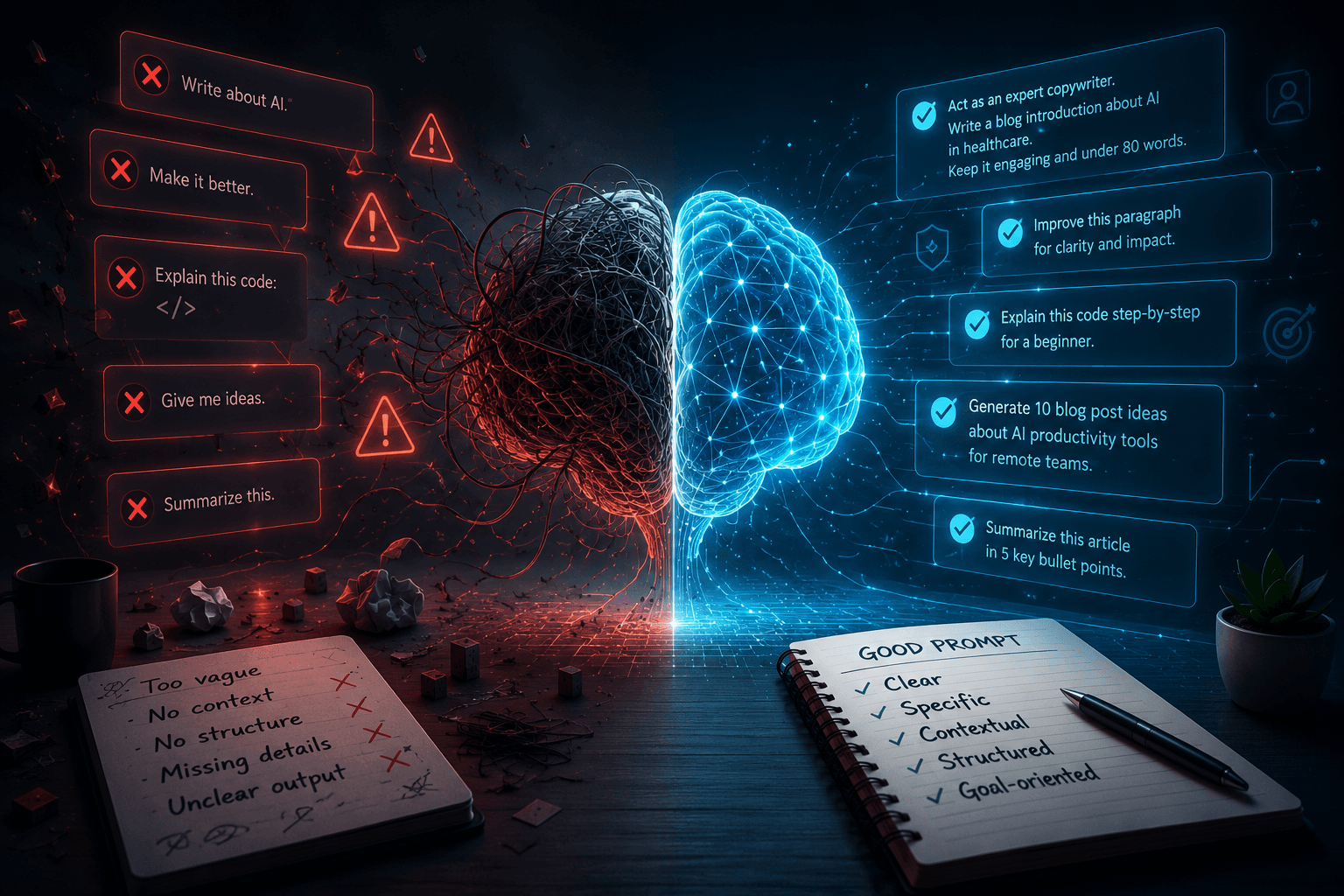
Before: "Write me an email to an unhappy client." After: "You are a senior customer success manager with 10 years of experience in B2B SaaS. Write an email to a client who's threatening to cancel after a production outage that affected their team for 3 hours..."
The difference in output quality is immediate and significant.
2. The Context
The AI knows nothing about you, your industry, your audience, or your constraints - unless you provide that information. Context is the background information that allows the model to calibrate its response.
Before: "How can I improve my conversion rate?" After: "I run a natural skincare e-commerce store: 50,000 monthly visitors, €65 average order value, current conversion rate 1.2%. My primary audience is women aged 28-45. What are the 3 highest-impact optimizations I should test first, and in what order?"
The second prompt is 5x longer but will save you 10x the back-and-forth.
3. The Task
Be specific about what you want - not "help me with X" but "do Y, in format Z, with constraints W." The more precisely you define the action, the more targeted the result.
Before: "Help me with my resume." After: "Rewrite this resume bullet point for a senior Product Manager position at a Series B startup. Use strong action verbs, quantify results wherever possible, and keep it under 80 words."
4. The Output Format
Specify the structure of the response you want. Table? Numbered list? Paragraphs? Length? Technical level? Without this, the AI picks a "default" format - which is rarely what you need.
Useful format specifications:
- "Reply in 3 bullet points maximum"
- "Structure your response: problem / root cause / solution / next steps"
- "Use a comparison table with columns X, Y, Z"
- "Explain as if I'm a smart 16-year-old with no domain knowledge"
- "Be direct. No intro paragraph. No moralizing conclusion."
5. The Constraints
What you don't want is as important as what you do. Defining limits prevents the AI from drifting into unwanted territory.
- "Without mentioning competitors by name"
- "Avoid technical jargon"
- "Don't suggest solutions that require additional budget"
- "No bullet lists - write in paragraphs"
- "Don't hedge every statement with 'it depends'"
6 techniques that fundamentally change your results
Technique 1 - Few-Shot Prompting
Show an example of the result you want. AI reproduces the style, structure, and detail level of your examples with remarkable precision. This is the single most underused technique by non-technical users.
Best for: Writing, structured data generation, emails, social posts, anything with a specific style.
Here's an example of the tone I want: --- [Example]: "Will tomorrow's ChatGPT still be affordable? With an $852B valuation and an electricity bill that rivals some countries, the question is no longer hypothetical." --- Now write an opening hook in the same style for an article about the risks of generative AI in enterprise environments.
Technique 2 - Chain-of-Thought Reasoning
Explicitly ask the model to reason step by step before delivering its answer. This technique dramatically improves quality on complex tasks - math, logic, strategic analysis, anything requiring multi-step inference.
DeepSeek R1 does this automatically with its DeepThink mode. For other models, you need to request it explicitly.
How to trigger it:
- "Think step by step before answering."
- "Before giving your conclusion, list the assumptions you're making."
- "Show your reasoning. I want to understand how you reach this answer."
Applied example:
Before answering: list the 3 pieces of information you'd need to answer this question well. Then indicate which ones you have and which ones I'd need to provide. Only then give your best answer based on available information.
Question: How should I price my B2B SaaS product?
Technique 3 - Advanced Role Prompting
Beyond "you are an expert in X," define specific behaviors expected from that role. Make the persona operational, not just decorative.
You are a B2B SaaS copywriter with 15 years of experience who has worked with European unicorns and US scale-ups.
Your style: direct, no euphemisms, results-oriented. You never use the words "revolutionary," "innovative," or "game-changing." You write as if your reader is skeptical and pressed for time - because they are. You make your point in the first sentence, not the fourth.
Technique 4 - Iterative Prompting
Don't search for the perfect prompt on the first try. Start broad, then refine with follow-up instructions. This is the most natural and most effective way to use a large language model.
Round 1: "Give me 10 article ideas for an AI blog targeting developers."
Round 2: "Numbers 3, 7, and 9 are interesting. For each, give me 3 different angles - one technical, one business, one news-driven."
Round 3: "For the business angle of number 7, give me a full article outline with main sections and key arguments for each."
In 3 exchanges, you have something genuinely usable. In one ambitious mega-prompt, you'd have gotten something generic.
Technique 5 - Negative Prompting
Stating what you don't want is often more effective than describing what you do - especially for writing and formatting. Models have strong "default" behaviors that explicit negation can override.
Write an analysis of the competitive landscape in the AI tools sector in 2026.
Do NOT:
- Start with "In today's rapidly evolving AI landscape..."
- Use phrases like "it is important to note that..."
- End with a vague "the future will tell" conclusion
- Give me a list of 10 equally weighted generic points
- Hedge every claim with "but it depends on the context"
Technique 6 - Structured Output Prompting
For tasks requiring structured output - data generation, content for systems integration, information extraction - specify the exact format. This makes the output immediately usable without manual reformatting.
Analyze the following 3 AI tools and return your response in this exact format:
TOOL: [name] SCORE: [X/10] PRIMARY_STRENGTH: [one sentence] PRIMARY_LIMITATION: [one sentence] BEST_FOR: [user profile in 10 words max] ---
Tools to analyze: ChatGPT Plus, Claude Pro, Perplexity Pro
Reference table: which technique for which tool
Each model has different strengths. Matching your prompting style to the tool you're using makes a measurable difference.
| Technique | ChatGPT | Claude | Perplexity | DeepSeek R1 |
|---|---|---|---|---|
| Few-shot | ⭐⭐⭐⭐⭐ | ⭐⭐⭐⭐⭐ | ⭐⭐⭐ | ⭐⭐⭐⭐ |
| Chain-of-Thought | ⭐⭐⭐⭐ | ⭐⭐⭐⭐⭐ | ⭐⭐⭐ | ⭐⭐⭐⭐⭐ (native) |
| Role Prompting | ⭐⭐⭐⭐ | ⭐⭐⭐⭐⭐ | ⭐⭐⭐ | ⭐⭐⭐⭐ |
| Structured format | ⭐⭐⭐⭐⭐ | ⭐⭐⭐⭐⭐ | ⭐⭐⭐⭐ | ⭐⭐⭐⭐ |
| Real-time search | ⭐⭐⭐⭐ | ⭐⭐⭐ | ⭐⭐⭐⭐⭐ | ⭐⭐⭐⭐ |
| Creative writing | ⭐⭐⭐⭐⭐ | ⭐⭐⭐⭐⭐ | ⭐⭐⭐ | ⭐⭐⭐ |
| Complex code | ⭐⭐⭐⭐⭐ | ⭐⭐⭐⭐⭐ | ⭐⭐ | ⭐⭐⭐⭐⭐ |
| Document analysis | ⭐⭐⭐⭐⭐ | ⭐⭐⭐⭐⭐ | ⭐⭐⭐⭐ | ⭐⭐⭐⭐ |
Practical rules:
- Perplexity: anything requiring d, recent sources
- Claude: long-form writing, nuanced analysis, document review, creative quality
- ChatGPT: code, structured tasks, versatility, persistent memory
- DeepSeek R1: math, logical reasoning, complex code - for free
The 10 most common prompting mistakes
1. The too-short, too-vague prompt
"Write an article about AI" - no context, no angle, no audience = guaranteed generic output. Never start a serious prompt in under 30 words.2. Forgetting to specify the audience
The AI doesn't know if you're writing for a first-year student or a CTO. Always specify. It changes everything about vocabulary, depth, and assumptions.3. Asking for multiple things at once
"Analyze this text, fix the errors, improve the style, and translate it to French" → mediocre results on everything. Do one thing at a time, or specify a clear order.4. Not providing an example
If you have a specific style or format in mind, show it. "Like this example" beats 200 words of description every time.5. Accepting the first response without iterating
The first response is almost never the best. Ask for variations, push on a weak point, challenge an assumption. Dialogue improves the result.6. Over-polite prompting
"Could you perhaps consider helping me..." - LLMs aren't offended by directness. Be direct. It doesn't make you rude; it makes you clearer.7. Not specifying length
Without guidance, AI chooses a "medium" length. If you want 3 sentences or 2,000 words, say so explicitly.8. Ignoring session context
In long conversations, early instructions can get diluted. Restating the role or key constraints at the start of an important message is good practice.9. Asking for opinion without a frame
"What do you think of my strategy?" → diplomatic hedging by default. Instead: "Identify the 3 critical weaknesses in this strategy as if you were a skeptical investor who's seen a hundred pitch decks."10. Not using negative constraints
Saying what you don't want is as valuable as saying what you do. "No introduction. No conclusion. No bullet points." - this alone changes the output dramatically.20 copy-paste templates
Ready-to-use prompts. Replace [brackets] with your information.
Writing & content
You are an expert writer specializing in [industry]. Write a [X-word] article on [topic] for an audience of [reader profile]. Tone: [direct/academic/conversational]. Structure: strong hook + 3 sections with subheadings + conclusion with CTA. Avoid: jargon, generalities, passive voice.
Rewrite this paragraph to be [50% shorter / more punchy / more LinkedIn-appropriate / understandable by a non-specialist]. Keep the exact meaning. Don't change any facts. [PASTE PARAGRAPH]
Analysis & strategy
Analyze [document/situation/strategy] like a McKinsey consultant specializing in [industry]. Identify: (1) the 3 strengths, (2) the 3 critical weaknesses, (3) the 2 opportunities to prioritize. Be direct. Take clear positions. Avoid vague formulations.
I need to make a decision about [topic]. Arguments for: [list] Arguments against: [list] Play devil's advocate: give me the 3 strongest reasons NOT to choose the option I seem to favor.
Code & technical
You are a senior [language/framework] developer with 10 years of experience. Review this code. Identify: (1) potential bugs, (2) performance issues, (3) bad practices. For each issue: explain why it's a problem and provide corrected code. [PASTE CODE]
Explain [technical concept] in three different ways: 1. In one sentence, for someone with zero technical background 2. In 3 sentences, for a junior developer 3. In 5 sentences, with important nuances, for a senior engineer
Email & communication
Write an email of [max X lines] to [recipient profile] with the goal of [objective]. Context: [situation]. Tone: [professional but direct / warm / firm]. The email should: [get X / schedule a call / decline politely / follow up without seeming pushy]. Subject line: propose 3 variants.
I need to have a difficult conversation with [profile] about [topic]. Prepare me: anticipate the 5 most likely objections or reactions and give me a calibrated response for each. My goal: [desired outcome].
Learning & research
Explain [concept] from scratch. I already know [prerequisite knowledge]. Use concrete analogies. Give a real-world example for each key concept. At the end, ask me 3 questions to test my understanding.
I want to understand [topic] quickly. Give me: (1) the core idea in 2 sentences, (2) the 5 things I absolutely need to know, (3) the 2 most common misconceptions and why they're wrong, (4) 3 resources for going deeper.
Brainstorming
Generate 20 ideas for [objective]. First 10: proven, effective approaches. Next 10: counter-intuitive or unconventional approaches. Don't filter for "feasibility" - I want range.
I'm working on [project/product]. My problem: [problem]. Play 3 different roles and give me each one's solution: 1. An engineer obsessed with efficiency 2. A designer focused on user experience 3. A CFO focused purely on cost
SEO & marketing
Generate 15 title ideas for an article about [topic]. Audience: [profile]. 5 titles: list format ("X Ways to...") 5 titles: question format 5 titles: strong statement / counter-intuitive format For each title: rate the sensationalism level from 1 to 5.
Write a meta description of maximum 155 characters for a page about [topic]. Primary keyword to include: [keyword]. Tone: [informative / urgency / curiosity]. End with an action verb. Propose 3 variants.
Productivity
I have [X hours] to complete [list of tasks]. Prioritize them using the Eisenhower matrix. For the top 3 priority tasks: give me an execution plan broken into 15-30 minute sub-steps.
Summarize this document at 3 levels of detail: 1. In 1 sentence (for someone with no time) 2. In 5 sentences (for someone with 2 minutes) 3. In 10 key points (for someone who needs to make a decision) [PASTE DOCUMENT]
Read next
These articles are the best follow-up to what you are reading.
Adapting your approach by model
On ChatGPT
ChatGPT handles direct, structured instructions extremely well. It's excellent for complex formats and code. For writing, specify tone explicitly - it defaults to corporate bland if you don't push it.
Specific tip: use ChatGPT's persistent memory feature to define your preferences once. In settings, you can tell it your industry, role, and preferred style - it remembers across every conversation.
On Claude
Claude is the strongest model for long-form, nuanced writing. It's particularly sensitive to style and tone instructions. Give it examples and it adapts with remarkable precision.
For long documents: Claude accepts very large context windows - paste entire contracts, reports, or documents directly into the prompt.
Specific tip: Claude tends to over-hedge and over-nuance. If you want a clear position, demand it: "Take a stance. Don't say 'it depends.' Give me your best answer with available data."
On Perplexity
Perplexity is built for sourced research, not creative writing. Your prompts should be oriented toward factual, current information retrieval rather than generation.
Specific tip: specify a date or time period - "in Q1 2026", "in the last 6 months" - to get fresh results rather than general knowledge.
On DeepSeek R1
DeepSeek R1 reasons explicitly before responding. For complex problems, let it develop its chain of thought - don't force it to be brief on questions that require depth.
Specific tip: ask it to "doubt its own conclusions" on high-stakes analysis. DeepSeek R1 is particularly good at identifying the weaknesses in its own reasoning when explicitly prompted to do so.
Going further: the system prompt
For advanced users or those building on the API, the system prompt is the foundational instruction that precedes any conversation. This is where you define the character, rules, style, and permanent constraints of any AI-powered application.
Example of an effective system prompt for a writing assistant:
You are Alex, a senior writer specializing in B2B tech content. You have 12 years of experience in content marketing for SaaS scale-ups.
Your style:
- Short sentences. Maximum 20 words per sentence.
- Active voice, never passive.
- Data and concrete examples before generalizations.
- Never write "It is important to note that..."
- Conclusions with a concrete action, never a platitude.
- If you don't know something, say so clearly rather than guessing.
- If the question is ambiguous, ask ONE clarifying question before answering.
- If you spot a problem with what you're being asked to do, flag it before executing.
This kind of prompt, set once at the start of a session or in system settings, fundamentally transforms the quality of every interaction that follows.
Prompt engineering isn't a technical skill
The most important thing to understand: prompting isn't reserved for developers or engineers. It's a communication skill - the ability to clearly articulate what you want, in what context, with what constraints.
People who tend to excel at prompting naturally are often writers, lawyers, teachers, and project managers - people accustomed to writing precise instructions for other humans. If you can write a detailed creative brief, a clear specification document, or a well-structured memo, you already have the core skills.
What you develop with experience: understanding the specific blind spots of each model. Knowing when a response is too generic because context is missing, versus when it's incorrect because the model hallucinated. Building intuition for which technique to apply to which type of problem.
That comes with practice. The only way to get better at prompting is to prompt - and pay attention to what works.
Our verdict
Prompt engineering is the highest-return AI skill you can develop in 2026. It works across every tool - ChatGPT, Claude, Perplexity, Midjourney, and everything else you use daily. It doesn't become obsolete between model versions. And it's accessible to everyone, starting today.
Begin with the 5 foundational elements. Try Chain-of-Thought on your next complex analysis. Add a role and a format to every writing prompt as a default habit. The improvement in results will be visible from the very first try.
AI Prompting FAQ
What is prompt engineering?
Prompt engineering is the practice of crafting precise, effective instructions for AI models like ChatGPT, Claude, or Gemini. The goal is to get more useful, accurate, and contextually appropriate responses by structuring your inputs intelligently - including role, context, task, format, and constraints.
Do I need to be a developer to write good prompts?
No. Prompting is fundamentally a communication skill. If you can write a clear creative brief, a precise specification, or a well-structured memo, you already have the core abilities. Non-technical professionals who are used to writing precise instructions for other humans often pick this up faster than engineers.
Do prompting techniques work the same way across all AI models?
The core principles (context, role, format, constraints) work across all major models. But each model has different strengths: Claude excels at long-form nuanced writing, DeepSeek R1 at visible reasoning, Perplexity at sourced research. Adapting your technique to the tool you're using makes a measurable difference.
What's the difference between a prompt and a system prompt?
A prompt is your instruction for a specific response. A system prompt is a foundational instruction that defines the AI's behavior for an entire session or application - the role, style, and permanent rules. System prompts are used primarily via the API or in advanced interfaces like ChatGPT's custom GPTs.
How long does it take to get good at prompting?
You'll see a measurable improvement from your first attempt if you apply the 5 foundational elements. With a week of regular practice, most techniques become second nature. Advanced mastery - knowing exactly which approach to take for each problem type - develops over weeks to months depending on how intensively you use these tools.
Neuriflux verdict
Our take: How to Write AI Prompts That Actually Work in 2026 - The Complete Guide matters because the difference comes down to reliability, memory, reasoning quality, and integration into daily workflows.
Detailed Neuriflux score
- Practical value : 8.8/10 — useful for deciding, comparing, or understanding quickly.
- Clarity : 9/10 — accessible without losing important nuance.
- 2026 potential : 9/10 — likely to affect real AI workflows.
- Hype risk : Low to medium — should be validated with concrete tests before adoption.
Who is it actually useful for?
- heavy AI users
- developers and creators
- teams comparing models before paying
Avoid it if...
- you expect one model to be perfect at everything
- you never verify factual answers
- you are highly sensitive to pricing or usage-limit changes
Why this score?
We do not rate only popularity or marketing promises. The score reflects practical value, maturity, real limitations, potential cost, and long-term relevance for a Neuriflux reader.
> Neuriflux signature — The goal is to separate what is genuinely useful from what is merely well presented. The goal is to understand the topic clearly enough to make a better decision afterward.
Method and reliability
This article is designed as a living resource. Prices, features, and market positions can change quickly in AI; when a detail depends directly on a vendor, plan, or recent announcement, always check the official page before making a final decision.
Last editorial check: April 5, 2026.
 97% match
 87% match
 88% match97% match
 85% match
 93% match
 84% match
 85% match
 95% match
 94% match
 85% match
 83% match
 95% match
 88% match
 91% match