12 AI Prompt Mistakes Everyone Makes - and How to Fix Them
Getting weak results from AI? The model probably isn't the problem. After analyzing hundreds of prompts, we identified 12 mistakes 90% of users make - with before/after examples that show exactly what changes when you get it right.
30-second takeaway
Neuriflux summary: 12 AI Prompt Mistakes Everyone Makes - and How to Fix Them — real value depends on integration with your existing tools and reduced repetitive work, not just announced features.
- Content type: Productivity · tutorial.
- What you get: a fast read on use cases, limits, alternatives, and decision points.
- Quick verdict: The goal is to understand the topic clearly enough to make a better decision afterward.
- Editorial score: 8.8/10, adjusted to the topic instead of copied across articles.
Why your prompts aren't delivering what you expect
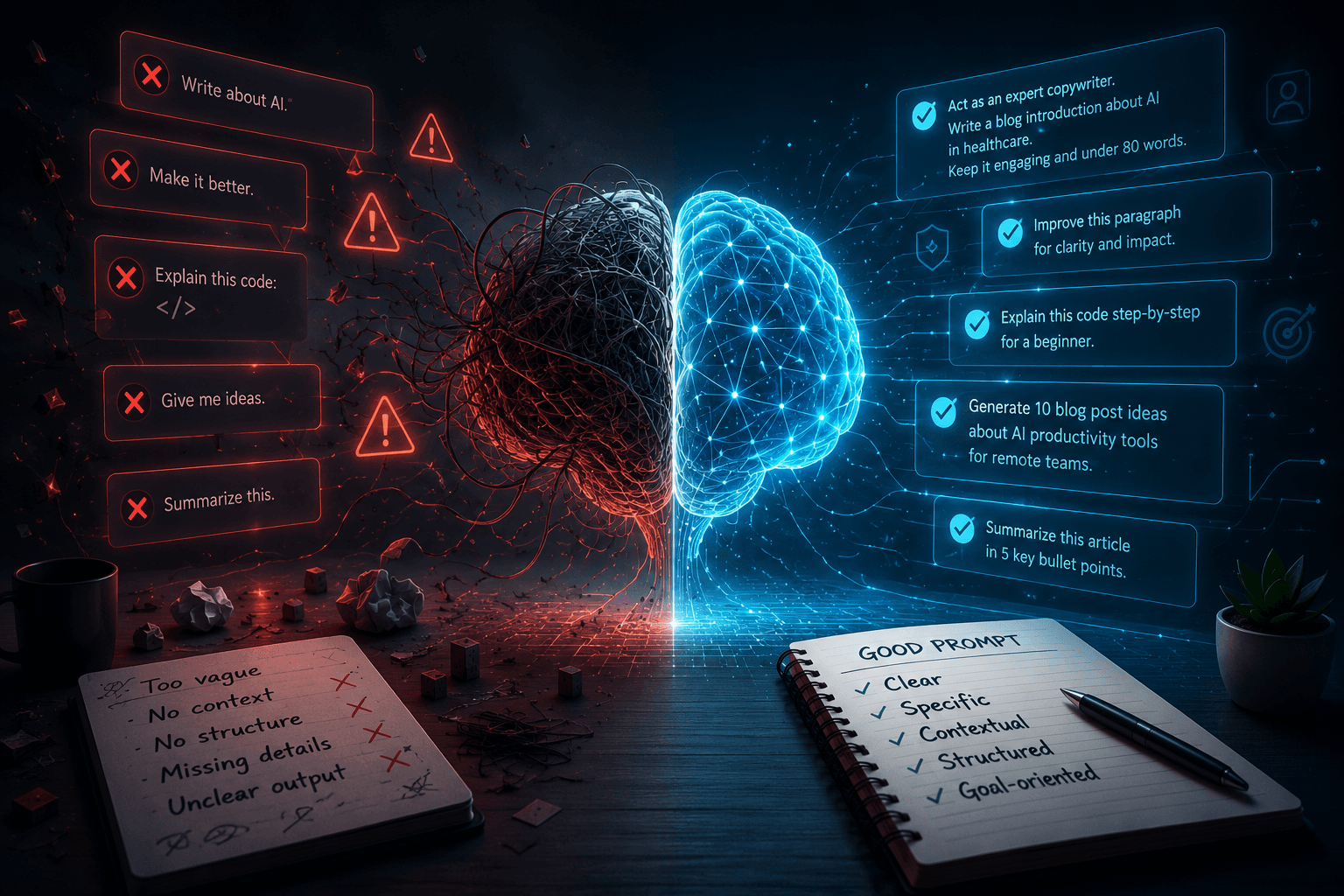
There's a widespread assumption in the AI community: if the output is bad, the model must be limited. This is almost never true. In the vast majority of cases, the response is poor because the question was vague, incomplete, or poorly framed.
After analyzing hundreds of prompts - our own, readers', and the most common ones circulating in forums - a clear pattern emerges: the same mistakes come up again and again. Not technical mistakes. Communication mistakes. AI doesn't read your mind. It responds to exactly what you ask. Nothing more, nothing less.
This article covers the 12 most common errors, with a before example (the prompt that disappoints) and an after example (the one that gets results) for each. No theory - just practical fixes you can apply immediately.
Mistake #1 - Asking without providing context
This is the number one error, by far the most common. People ask for a response as if the AI already knows their situation, project, and constraints.
❌ Before: "Write me a follow-up email."
✅ After: "Write a professional follow-up email for a B2B prospect in commercial real estate. I sent them a proposal 10 days ago with no reply. Tone: warm but direct. Length: under 150 words. Goal: get a response - not force a meeting."
What changes: context transforms a generic request into a specific one. The AI stops guessing and starts executing. The second version produces a usable email immediately. The first produces a lifeless corporate template.
The rule: before sending a prompt, ask yourself - "would a human writer have enough information to respond correctly?" If the answer is no, the prompt is incomplete.
Mistake #2 - Not giving the AI a role
An AI without a defined role responds as a cautious generalist. An AI with a precise role responds as an engaged expert. The quality difference is striking.
❌ Before: "Give me some advice for improving my website."
✅ After: "You are a senior UX consultant specializing in B2B SaaS with 15 years of experience. Analyze these 3 problems on my website and give me the 5 highest-priority changes to increase conversions: [description]."
What changes: the role shapes the register, depth, and posture of the response. "Senior UX consultant" produces a structured, professional answer with clear priorities. Without a role, you get the kind of generic advice found in any blog post.
The rule: start your prompts with "You are [precise role with specialization]." The more specific the role, the better the output.
Mistake #3 - Forgetting to specify the output format
You ask for an analysis. The AI gives you eight paragraphs of dense prose. You wanted a table. Result: ten minutes reformatting what the AI could have produced directly in ten seconds.
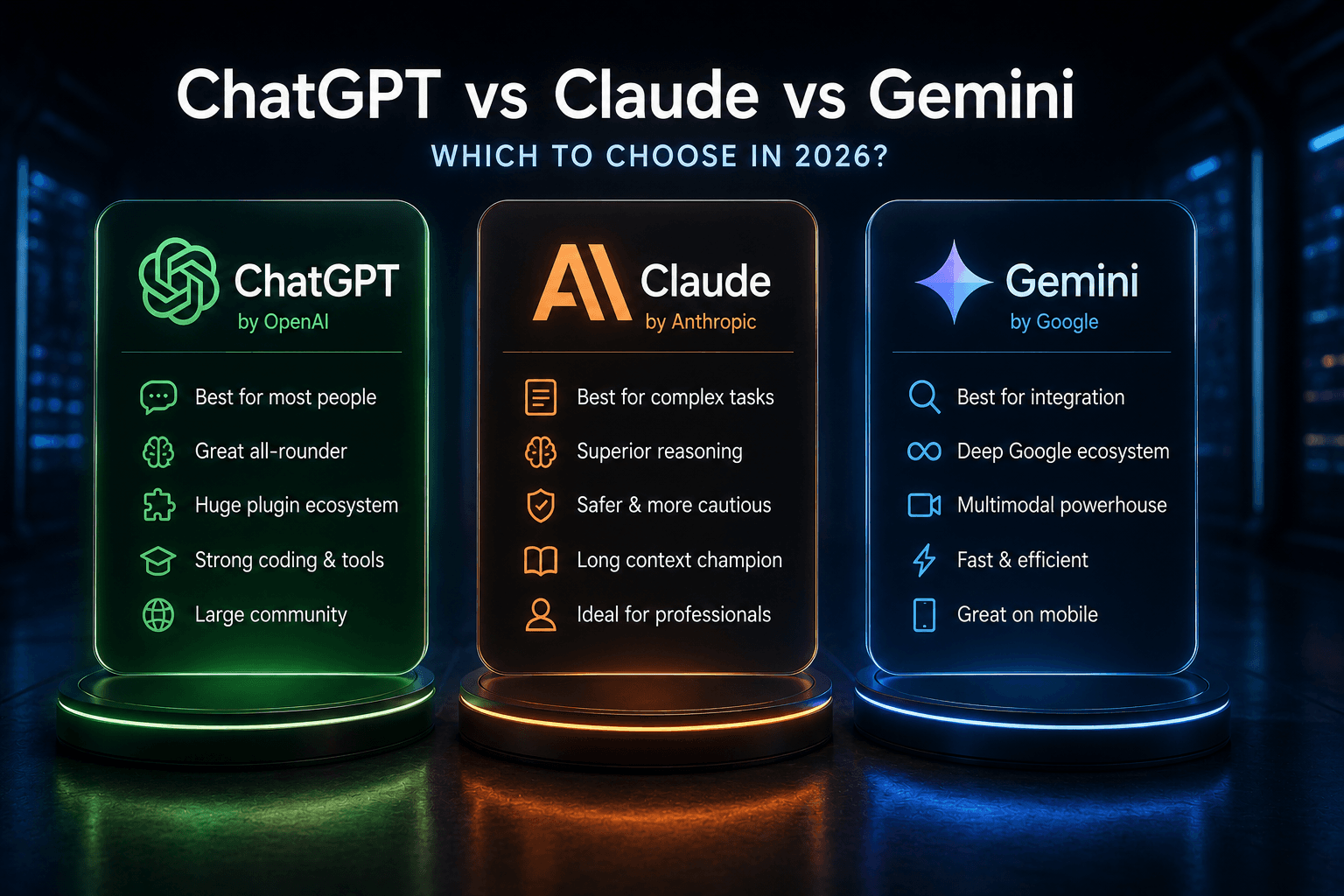
❌ Before: "Compare ChatGPT, Claude and Gemini."
✅ After: "Compare ChatGPT, Claude and Gemini in 2026 on these 5 criteria: writing, coding, web search, pricing, context window. Present the result as a Markdown table with a 'Quick verdict' column for each tool. End with a 3-line recommendation."
What changes: specifying the format eliminates interpretation. The AI knows exactly what to produce. You get something usable without any post-processing.
The rule: always specify the output format - table, numbered list, bullet points, JSON, email, article, code, prose. If length matters, specify that too.
Mistake #4 - Asking multiple questions at once
One prompt = one task. When you ask three questions in a single message, the AI handles all three superficially. It can't go deep on everything simultaneously.
❌ Before: "Can you explain how machine learning works, give me real-world marketing examples, and tell me which tools to use to get started?"
✅ After (3 separate prompts):
- "Explain machine learning as if I'm a marketer with no technical background. Maximum 200 words."
- "Give me 5 concrete applications of machine learning in B2B marketing, with a real company example for each."
- "What are the 3 most accessible no-code tools for a marketer who wants to integrate ML into their workflow in 2026?"
The rule: one idea, one prompt. If your message contains multiple question marks or multiple "ands," break it apart.
Mistake #5 - Accepting the first response without iterating
The first response is rarely the best one. The AI gives you its interpretation of your request - not necessarily the right one. Iteration is the most underused prompting skill.
❌ Common behavior: read the first response, decide it's "not great," and either use it anyway or start over with the same prompt.
✅ Better approach:
- "Good structure but too formal. Rewrite it with a more direct, less corporate tone."
- "The second paragraph is perfect. Rewrite the other two in the same register."
- "Too long. Cut it in half without losing the 3 key points."
- "Now give me an alternative version that argues the exact opposite."
The rule: treat AI like a collaborator, not a vending machine. The first response is the starting point, not the destination.
Mistake #6 - Being too polite (or too aggressive)
"Please," "thank you," "could you perhaps" don't improve output quality. They add length without value. Conversely, aggression or conflicting instructions produce erratic responses.
❌ Before: "Hi! I was wondering if maybe you could help me write, if at all possible, a product description for my e-commerce store? Thanks so much in advance!"
✅ After: "Write a product description for a natural lavender candle priced at $34. Target: women 30-50 interested in wellness and handcrafted goods. Format: 80 words max, strong hook, 3 benefits, call to action. Tone: warm and premium, no empty superlatives."
What changes: the direct prompt says exactly what you want. The AI doesn't need to interpret hesitations or politeness formulas - it executes.
The rule: write prompts like professional briefs, not messages to a stranger. Politeness is unnecessary. Clarity is everything.
Mistake #7 - Not providing examples
Abstract instructions produce abstract results. Showing an example of what you want - or what you don't want - is one of the most powerful prompting levers available.
❌ Before: "Write some punchy headlines about AI."
✅ After: "Generate 10 article headlines about AI for a tech blog. The tone should be direct and jargon-free, like these examples I like: 'The AI Reading Your Emails - What Microsoft Isn't Saying', 'ChatGPT Lies. Here's When and Why.' Avoid headlines with question marks and phrases like 'Everything You Need to Know About...'"
What changes: a concrete example calibrates register, language level, and style better than any abstract description. The AI immediately understands what "punchy" means to you.
The rule: an instruction with an example is ten times more effective than an instruction alone. Provide examples of what you want AND what you don't.
Read next
These articles are the best follow-up to what you are reading.
Mistake #8 - Ignoring the audience parameter
An explanation of cybersecurity looks completely different depending on whether it's addressed to a CISO, a non-technical manager, or a student. Without specifying the audience, the AI defaults to a neutral language level - which is rarely yours.
❌ Before: "Explain what phishing is."
✅ After: "Explain phishing to non-technical employees at a 50-person company. Use everyday metaphors, no jargon. Include 2 realistic recent attack examples. End with 3 simple habits to adopt immediately. Format: internal article of 300 words max."
What changes: the audience defines vocabulary, analogies, depth, and tone. "Non-technical employees" produces something readable and actionable. Without this specification, the response is often either too technical or too vague.
The rule: always define who the content is for. Knowledge level, industry, age group, context - anything that helps the AI calibrate its register.
Mistake #9 - Asking for an opinion without giving permission
"What do you think about [X]?" is the question that produces the most evasive AI responses. By default, models are trained to balance perspectives and avoid strong positions. If you want a real opinion, you have to explicitly allow it.
❌ Before: "What do you think about remote work?"
✅ After: "Give me a sharp, opinionated take on remote work for an opinion piece aimed at managers in 2026. You can defend or attack it - what matters is that the argument is strong and cuts against the usual clichés. No 'on one hand / on the other hand,' no lazy nuance. One clear point of view with arguments that provoke."
What changes: you explicitly authorize the AI to take a position. The instruction "no lazy nuance" cuts off the default fence-sitting response.
The rule: if you want a strong opinion, say so explicitly. Give a direction or let the AI choose, but specify that you want a real point of view, not a diplomatic non-answer.
Mistake #10 - Not specifying tone and register
By default, AI produces standard, neutral writing with no distinctive voice. For content that sounds like you or fits your brand, you need to specify the register - including what to avoid.
❌ Before: "Write a LinkedIn bio for a tech entrepreneur."
✅ After: "Write a LinkedIn bio for an entrepreneur who co-founded 2 B2B SaaS companies and is targeting seed investors. Register: direct and confident, not arrogant. No 'passionate about' or 'I had the privilege of.' No bullet points. A flowing first-person text, max 120 words, ending with a hook that makes someone want to reach out. Inspired by the style of Paul Graham or Naval Ravikant."
What changes: the prohibitions ("passionate about," bullet points, arrogance) are as important as the positive instructions. A style reference (Paul Graham) instantly calibrates the register without requiring a detailed description.
The rule: specify register with positive AND negative examples. Prohibitions are often more effective than prescriptions.
Mistake #11 - Using AI as a search engine
"What's the latest news on [X]?" asked to a model without web access is a recipe for failure. The AI will either confabulate or warn you it has no real-time access - neither of which helps you.
❌ Before: "What are Mistral AI's financial results in 2026?"
✅ Better approach: use Perplexity for current events and recent data, then bring that data to ChatGPT or Claude for analysis and synthesis.
Adapted prompt: "[Paste Perplexity results here] - Based on this data, analyze Mistral AI's financial trajectory and compare with other European AI pure players. Give me a 5-point verdict on their 3-year viability."
What changes: you use each tool for what it does best. Perplexity to find, Claude or ChatGPT to analyze and synthesize. The combination is unbeatable.
The rule: AI without web access knows nothing after its training cutoff. For anything recent - news, prices, financial data, events - use a search tool first.
Mistake #12 - Not saving your best prompts
This is the most avoidable mistake - and yet nearly universal. You finally find the perfect prompt for a recurring use case. You use it once, get an excellent result. Then you lose it in the conversation history.
❌ Common behavior: rebuilding the prompt from scratch every time, hoping to reconstruct the same wording.
✅ Better approach:
- Keep a "prompt library" document organized by use case (writing, analysis, code, emails...)
- Version prompts that work, like code: v1, v2, v2.1
- Create "prompt templates" with fillable variables: [AUDIENCE], [TOPIC], [FORMAT], [LENGTH]
- Use ChatGPT's custom instructions or Claude's Projects to store recurring context
The rule: the moment a prompt produces a result that's clearly above average, save it immediately with a note on the use case.
The 3 principles that sum it all up
If you only take three things from this article:
1. Context + Role + Format = 80% of the work
These three elements alone dramatically improve the quality of any response. Before every important prompt, check that all three are present.2. Iterate, don't restart
The first response is rarely the best. One or two rounds of refinement almost always produce something noticeably better. Use the conversation context.3. AI responds to exactly what you ask
Nothing more, nothing less. If the result is disappointing, the cause is in the prompt 90% of the time. Read your prompt as if you were the AI - you'll immediately see what's missing.Go further: the resources that change the game
These 12 fixes are a strong starting point. To go deeper into prompt mastery:
- Our complete AI prompts guide 2026 - advanced techniques, chain-of-thought, few-shot prompting
- Perplexity AI for research prompts with real-time web access
- ChatGPT vs Claude vs Gemini to choose the right model for your main use case
FAQ
Does prompt quality really change the output that much?
Yes - dramatically. On the same models (GPT-4o, Claude 3.7, Gemini 2.5), an optimized prompt can produce a result 3 to 5 times more useful than a vague prompt on the same topic. It's not magic: it's information. AI produces value proportional to the quality of the inputs.
Do these tips apply to all AI models?
Yes, for the most part. The principles of context, role, format, and iteration work with ChatGPT, Claude, Gemini, Mistral, and all current language models. Nuances exist - Claude responds better to explicit tone instructions, GPT-4o is more flexible with formats - but the foundation is universal.
Do I really need that much detail in every prompt?
No, not always. For simple, one-off tasks, a short prompt can be enough. The 12-mistake framework applies most strongly to prompts for important, recurring, or complex content. Match the level of detail to the stakes of the task.
How do I remember all these rules?
You don't need to memorize them. Bookmark this article and refer to it when a prompt underperforms. With practice, the habits install themselves naturally - most advanced users apply these rules instinctively after a few weeks.
Neuriflux verdict
Our take: 12 AI Prompt Mistakes Everyone Makes - and How to Fix Them matters because real value depends on integration with your existing tools and reduced repetitive work, not just announced features.
Detailed Neuriflux score
- Practical value : 8.8/10 — useful for deciding, comparing, or understanding quickly.
- Clarity : 9/10 — accessible without losing important nuance.
- 2026 potential : 9/10 — likely to affect real AI workflows.
- Hype risk : Low to medium — should be validated with concrete tests before adoption.
Who is it actually useful for?
- teams automating repetitive tasks
- solo operators centralizing workflows
- small businesses seeking concrete operational gains
Avoid it if...
- your processes are not clear yet
- you do not want to configure or maintain the tool
- your data is too sensitive without governance
Why this score?
We do not rate only popularity or marketing promises. The score reflects practical value, maturity, real limitations, potential cost, and long-term relevance for a Neuriflux reader.
> Neuriflux signature — The goal is to separate what is genuinely useful from what is merely well presented. The goal is to understand the topic clearly enough to make a better decision afterward.
Method and reliability
This article is designed as a living resource. Prices, features, and market positions can change quickly in AI; when a detail depends directly on a vendor, plan, or recent announcement, always check the official page before making a final decision.
Last editorial check: May 12, 2026.
 97% match
 83% match
 88% match97% match
 85% match
 93% match
 84% match
 85% match
 95% match
 85% match
 87% match
 95% match
 85% match
 88% match
 88% match